

MacroMesh @MacroMesh1
Macro Mesh is an all-in-one control and crosshair studio for players who want more freedom in how their setup feels and performs. Play your way! store.steampowered.com/app/4607280/Ma… Canada Joined June 2026-
Tweets9
-
Followers23
-
Following103
-
Likes61
Our steam page has also been updated. Have a great day, and play your way! store.steampowered.com/app/4607280/Ma…
A major Macro Mesh update is here. New creation tools, Instant Replay, Steam Workshop support, deeper input control, performance upgrades, and a huge list of fixes. Here’s what’s new! Experimental features: Replay, Screen Saver and Zoom are experimental. They work, but expect rough edges and bugs while we keep building them out. Please send bug reports — they go straight to us, and you'll get credited in-app when your report gets fixed. FEATURES Quick Assign Overlay A global shortcut now opens a minimal assignment overlay on top of whatever you're doing, so you can bind a key mid-game without alt-tabbing. It closes when you click away or press Esc, and hands focus straight back to your game. The overlay is hidden from screen capture, so it won't show up in recordings or streams. Screen Saver (experimental) Added a screen saver that blanks your displays after a period of inactivity. Added an option to hold it off while audio is playing, so it won't interrupt videos or music. The black style now genuinely powers your monitors down or drops the backlight rather than just painting the screen black, and Macro Mesh stops drawing while it's active. Instant Replay & Recording (experimental) Added instant replay and screen recording with a rolling buffer, hardware-accelerated capture, and system + microphone audio. Save clips with a hotkey, organize them with tags and folders, and trim or edit them in a built-in timeline editor with export and direct YouTube sharing. Added a Replay node so macros can save the buffer, start or stop recording, and change buffer length, quality, resolution, framerate and audio on the fly. Zoom & ADS (experimental) Added adaptive sensitivity — your mouse slows down proportionally as the lens zooms in, so aiming stays controllable at high magnification. Strength is adjustable. (Requires the Interception driver and Key Suppression enabled.) Added Independent Zoom, a toggle that lets zoom work while the crosshair is turned off. Steam Workshop Workshop support is live for macros, crosshairs and peripheral layouts — browse, subscribe, install, publish, edit and unshare without leaving the app. New Nodes Grid — define a region, set column and row counts, and step through cell coordinates to feed a Move To Click node. Includes a debug toggle that draws the grid on screen. Overlay — draw custom text and numbers anywhere on screen while a macro runs, so things like an ammo count can sit right next to your crosshair. Date & Time — supplies the current local time in a choice of formats, ready to pipe into a Print node. Translate — reads text on screen and translates it, and can push the result straight to the Overlay node to display it in place. Assignments Added a per-assignment on/off toggle so you can disable an assignment instead of deleting it. Added re-press to stop — choose whether the keys that started an assignment also stop it. Added temporary assignments — set them to unbind after a length of time or after a number of activations, with a live countdown. Macro Editor Added Macro Explorer — the right-hand panel now shows your macro's containers as a folder tree, so you can jump straight into any of them. Added a help button to every node that opens a page explaining what that node does, what each connection point is for, and how to use it. Added a new energy-beam connection style for the macro and crosshair animation editors, alongside the standard lines. Mouse Movement Calibration Added an on-screen calibration that learns how you actually move your mouse — trace a set of targets and Macro Mesh tunes the movement nodes' speed, acceleration and accuracy to match you. Driver-Level Input Added optional driver-level input so macros can reach games that ignore normal synthetic input. Added a Key Suppression settings page to install, check and manage the driver, plus a debugger that shows exactly which inputs are being blocked or passed through and why. Editors & Layouts Added a full keyboard editor — build backplates, rows, key clusters, labels, sizes and colours. Added a peripheral layout editor for arranging keyboards, mice and controllers with drag, snap, resize and rotate. Button assignment now supports mice and controllers, including learning non-standard inputs by pressing them a few times. Tutorials & Languages Added an interactive first-run tutorial — 14 chapters covering your first macro, crosshair design, building a keyboard or mouse, a settings tour and a drivers deep dive. Replayable any time from Settings. Tutorial steps include short looping clips for things that are easier shown than described, like connecting nodes and the order nodes activate in. Macro Mesh is now available in 9 languages: English, Spanish, French, German, Portuguese, Russian, Chinese (Simplified), Bengali and Filipino — including every tutorial card. You can pick your language during the first tutorial step. Cloud Saves & Bug Reports Your settings, macros, crosshairs and layouts are now stored per Steam account and set up for Steam Cloud, so they follow you between machines. Bug reports you send now carry your Steam account, so we can notify you in-app when your report is fixed — and give you credit for finding it. Anonymous reporting is still available. Interface Added Discord, YouTube and X links to the title bar. IMPROVEMENTS Input Recorder Holding a key no longer floods your recording with dozens of duplicate presses per second — auto-repeat is filtered as you record. Recordings now capture your monitor layout, so a recording made on one setup replays correctly on a different resolution or arrangement. Older recordings replay exactly as before. Playback can now be routed through the driver, so recordings reach games that block synthetic input. Fast mouse strokes now replay smoothly instead of jumping in coarse steps. Relative mouse movement in game mode is no longer distorted by Windows "Enhance pointer precision" when routed through the driver. Recorded playback now runs natively, so it starts faster and keeps better time. Recorded inputs are automatically wrapped in a frame, and you can change the lap length from inside that frame. Input Recorder — Editing The delay before the very first recorded input is now editable, as are gaps shorter than half a millisecond — previously neither had a row you could change. The old 450-node display cap is now an adjustable limit (default 500, up to 5000). Mouse paths can now be edited one sample at a time, rather than as a single opaque block. Fixed edits to delays being silently discarded on save. Fixed edits made to nodes inside the Input Recorder not being saved at all. Crosshair Crosshairs now sit perfectly centered on your screen at any size, instead of straddling the middle by half a pixel — and you can set the exact center point per monitor. The Rasterize option is now DPI-aware and works correctly on scaled and mixed-DPI monitors. Crosshair images now support an offset so you can position them independently. Macro Editor Connection lines are now drawn as smooth continuous paths rather than visibly segmented ones. Nodes can be dragged into and out of frames, with the target frame highlighting when a node is ready to drop in — and you can take a node out of a frame without exploding it. Frames now copy, paste and duplicate along with the nodes inside them. Frames and nodes can be moved in and out of container nodes, and connections survive the move. Hovering a connection line now highlights it and the connection points at both ends. Functions now share their contents properly — place the same function twice and both use the same body, and renaming one no longer breaks that link. Added undo and redo in the node editor (Ctrl+Z / Ctrl+Y), with a configurable history depth. Text-holding nodes now support normal text editing — select all, copy, cut, paste, undo, word jumps, Home/End and multi-line entry. The Print node types exactly the case you wrote, including capitals. Sliders that should only ever be whole numbers now step in whole numbers. The grid can now be drawn as dots instead of lines, and dots are the new default. Nodes The Noise node now nudges the cursor as a gentle drifting force based on the brightness of an area, instead of making it jitter erratically. The Region node can now have a new region picked on the fly with a keyboard shortcut, even while a macro is running. LLM nodes now support your own OpenAI (or OpenAI-compatible), Anthropic and Google API keys, alongside local models. Filled in missing help text for nodes that previously showed placeholders, including the Rotate node. Interface Every settings section and top-bar button now has an icon. Settings categories can be collapsed. The left toolbar is now scrollable, and you can show, hide and reorder its pages. Performance & Stability Macros bound to an assignment are now preloaded into memory instead of being read and compiled from disk on every activation, so the first press fires without a stall. Fixed the mouse randomly lagging or stuttering while Macro Mesh was open — key handling now runs entirely in native code instead of stalling Windows' input thread. Changing settings in the assignment area no longer stutters; saves are batched and moved off the interface thread. Zooming while editing a peripheral panel is now smooth, and no longer crashes when you zoom mid-stroke. The frame colour picker no longer lags while dragging the colour wheel. Zoom capture no longer blocks waiting for frames, recovering lost framerate and latency in full screen games. Added a framerate cap and a performance overlay. Compatibility Macros built in the old editor are repaired automatically when opened, so bringing them into the new system doesn't break them. BUG FIXES Zoom & ADS Fixed the zoom lens capturing things it shouldn't, including your crosshair and mouse cursor. Fixed the crosshair not drawing on top of the zoomed area. Fixed the ADS effect not applying at all — two of the three effect options silently fell back to a plain fade. Fixed zoom only appearing if you zoomed in or out while it was already active, rather than showing immediately. Fixed other inputs being delayed while holding the ADS button. Fixed zoom rendering incorrectly on flipped and rotated monitors. Crosshair Fixed the Target Parts node not affecting the animation preview. Fixed a border being drawn around images in the Target Parts node. Fixed crosshair images staying blank in the library until you reloaded or interacted with them. Fixed the center-pixel Show button doing nothing while the crosshair was toggled off. Fixed the thickness slider appearing for triangle, circle and square shapes, which don't use it. The layer dropdown on the Target Parts node now matches the width of its button and stays pinned to it. Macro Editor Fixed container nodes spilling their contents into the main scene after saving and reloading, and deleted containers resurrecting their nodes. Fixed renaming a function not renaming copies already placed in the scene. Fixed double-clicking a node's collapse arrow also opening the container node behind it. Fixed the node menu not appearing when you dragged a new line from an already-connected point and dropped it on empty space. Fixed dropdowns being cut off when zoomed out and floating away from their node when panning — they now close on zoom and pan. Fixed the macro grid drawing over the colour selection when it lost focus. Fixed the first sound effect in the macro editor being cut off at the start. In arc mode, connection bolts now stay attached to bundle handles instead of wandering off them. Assignments Fixed several assignment triggering and stopping bugs, including assignments set to play once not ending, and multi-press counts being lost. Fixed the "any keyboard key" cancel option failing when the key you pressed was also being held by a running macro. Fixed keycap colours not updating until you closed the colour selection. Nodes Fixed the region motion-detection node firing in games with no real movement, caused by camera bob, anti-aliasing and small frame-to-frame lighting changes. HUD & Layouts Fixed the Move HUD preview not matching the shape of your actual HUD. Fixed the Compact Laptop keyboard template having no backplate. Interface Fixed theme colours not fully updating when switching profiles until you changed tabs. Read the full notes and find Macro Mesh on Steam:

Here's our steam link! Our store page has also been updated. Have a great day, and play your way! store.steampowered.com/app/4607280/Ma…
Checkout our new logo! And our steam page! More updates coming soon. store.steampowered.com/app/4607280/Ma…

Introducing our tutorial section! We have a discord as well if you have any questions.

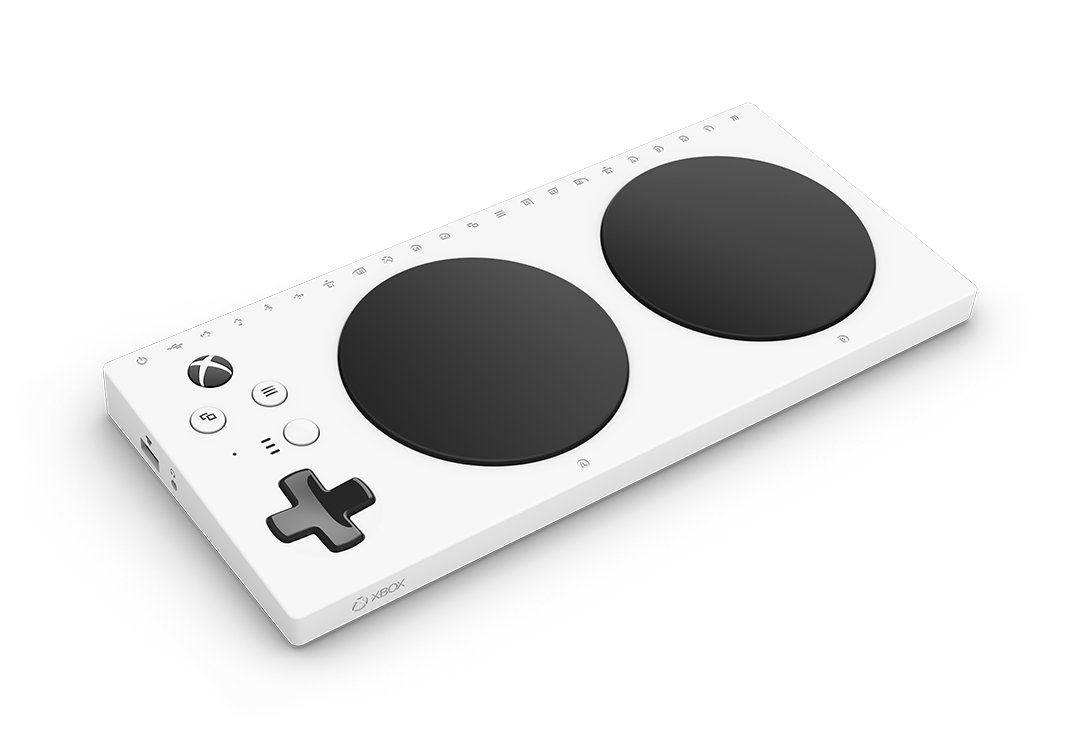
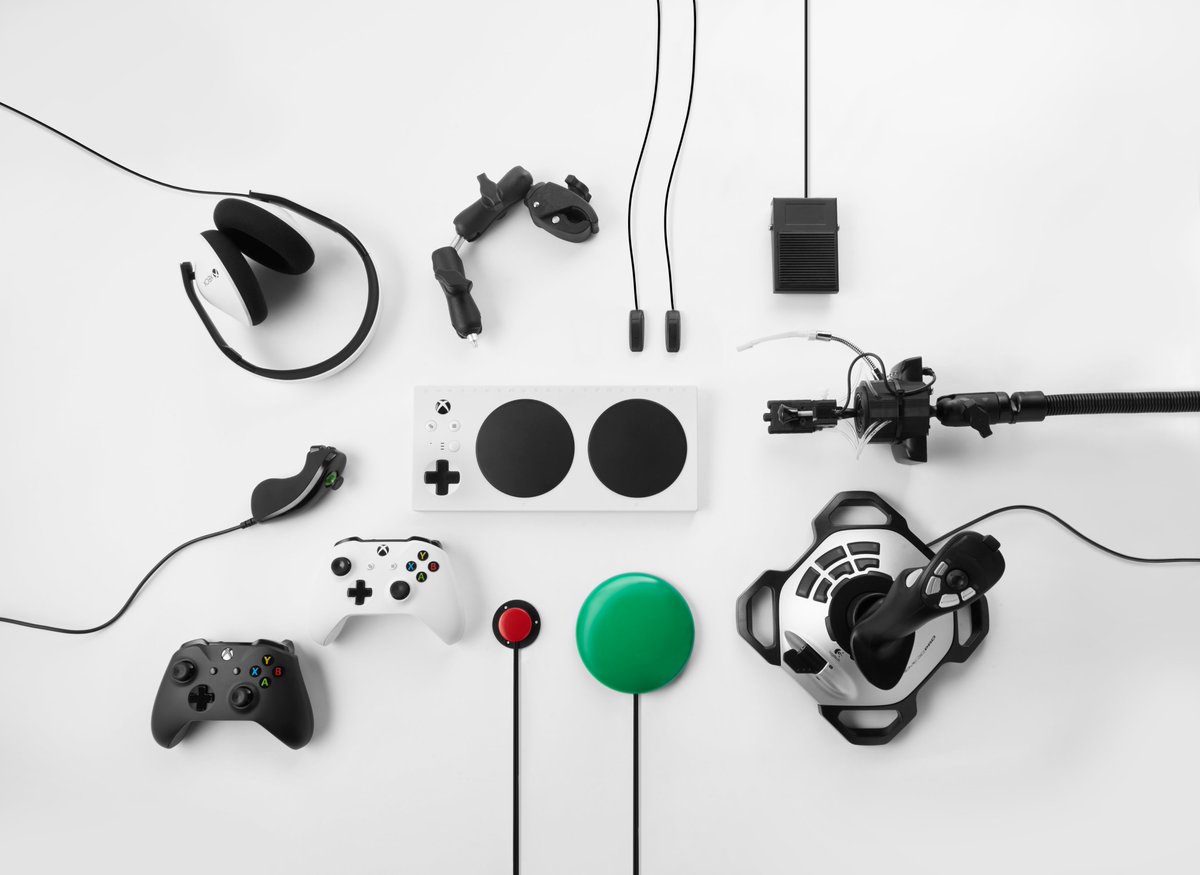
After years of work, I am incredibly proud to say that today we are officially announcing the Xbox Adaptive Controller - a device that makes gaming more accessible for people with limited mobility. #GameYourWay


Sneak peek at our new node connections


Lightstryker05 @JasonPowell5
2K Followers 5K Following IT Business Analyst, Gamer and Streamer! I enjoy supporting streamers! RPGs, Adventure, Souls-Like games, FPS, and Retro are my games! Game On!
𝙎𝘼𝙍𝘼 𝙑... @saravtuber65498
416 Followers 2K Following 𝙒𝙖𝙣𝙣𝙖 𝘽𝙚 𝙮𝙤𝙪𝙧 𝙁𝙖𝙫𝙤𝙪𝙧𝙞𝙩𝙚 𝙑𝙏𝙪𝙗𝙚𝙧 🟠 | Streamer | 𝙂𝙖𝙢𝙚𝙧 𝙂𝙞𝙧𝙡 🎮 | 𝘾𝙖𝙡𝙡 𝙈𝙚 𝙎𝙖𝙧𝙖𝙑𝙏 🦋 | VTUBER | 🎃
TGA | Matt Powell Mus... @TGA_Media
13K Followers 4K Following Streamer/Musician ~ Here to help creatives. Tag our channel when you’re going live or drop new Music! my team will share it across our platforms.
Dj slat @theloungedevils
4K Followers 3K Following send links to your new song for promotion and airplay and spinning

Bet105 @bet_105
14K Followers 12K Following Global Crypto Sportsbook | Reduced Juice | Winners Welcome | Instant Payouts💰
Logic @LogicProXGaming
1K Followers 974 Following advocate for mine craft accessibility. YouTube streamer. music producer. happens to be blind. @PoggersShop affiliate and @MineCraft partner
Lily Verse ♡ Celest... @Lily_Queen_VT_
2K Followers 1K Following Floating somewhere between stars and dreams ✨ Celestial cutie energy ♡ Adults only | No Minors

Elyel 🎮Ω @elyelgow
22K Followers 7K Following 𝐒𝐢𝐜 𝐩𝐚𝐫𝐯𝐢𝐬 𝐦𝐚𝐠𝐧𝐚 / 𝐬𝐜𝐜𝐩 /𝐏𝐥𝐚𝐲𝐬𝐭𝐚𝐭𝐢𝐨𝐧 𝐈𝐃 𝐝𝐚 𝐏𝐒𝐍: 𝐕𝐀𝐍𝐆𝐔𝐄𝐑𝟕𝟔
Olivia Ava @AvaOlivia26982
445 Followers 5K Following Just a soul trying to paint the world with dreams ✨
Sarah Grace I ENVtube... @sarahgrace8i
373 Followers 3K Following Patience is your greatest strength master it, and life won't break you
Kilie @willianMenDev
85 Followers 944 Following Anime lover • Gamer • Content Creator 🎮 Living life one quest at a time. Come hang out, laugh, and make memories together!
Amanda 💞 @amandaa_william
151 Followers 366 Following
Cats Lover @Animals7005
650 Followers 2K Following posting animal pictures daily. join me on this journey by following 🧸🐘
𝑨𝑳𝑩𝑨 ⚔�... @AlbaCalithea16
1K Followers 4K Following Alba Calithea 💜 | Stream Branding Specialist Custom overlays Vtuber Model & branding for Twitch/YouTube Clean, aesthetic & pro designs. Commissions open ✦⚔️
Exy @eth_exy
74K Followers 21K Following cooking in the lab - https://t.co/WI7ZkzKuZ0 @realcookhouse
💀 Rybørg 💀 @ryborggaming
400 Followers 2K Following Hooked on Monkey Fonics 🐒🥁 #BePostitivePlayGames
Cattigan619 @Cattigan619
444 Followers 637 Following Gaming Youtube,Streamer & Cosplayer from Ireland,grew up in the 90s, loves Retro Gaming and Wrestling.
Tortanga @thicc_stick_boi
15K Followers 274 Following Somehow survived twitter. Oh yea I run a very mid youtube channel and make videos and stuffs https://t.co/ERscnRbHQd
Faceroll_Fatality @Faceroll_Fatal
2K Followers 418 Following Veteran, Father of 5 including our Triplets, #Australian #Twitch #Streamer i live in the Game #SCUM @scumgame https://t.co/QpmxNIw3Bq
Kilie @willianMenDev
85 Followers 944 Following Anime lover • Gamer • Content Creator 🎮 Living life one quest at a time. Come hang out, laugh, and make memories together!
Cats Lover @Animals7005
650 Followers 2K Following posting animal pictures daily. join me on this journey by following 🧸🐘
Olivia Ava @AvaOlivia26982
445 Followers 5K Following Just a soul trying to paint the world with dreams ✨
Dj slat @theloungedevils
4K Followers 3K Following send links to your new song for promotion and airplay and spinning
𝙎𝘼𝙍𝘼 𝙑... @saravtuber65498
416 Followers 2K Following 𝙒𝙖𝙣𝙣𝙖 𝘽𝙚 𝙮𝙤𝙪𝙧 𝙁𝙖𝙫𝙤𝙪𝙧𝙞𝙩𝙚 𝙑𝙏𝙪𝙗𝙚𝙧 🟠 | Streamer | 𝙂𝙖𝙢𝙚𝙧 𝙂𝙞𝙧𝙡 🎮 | 𝘾𝙖𝙡𝙡 𝙈𝙚 𝙎𝙖𝙧𝙖𝙑𝙏 🦋 | VTUBER | 🎃
Lightstryker05 @JasonPowell5
2K Followers 5K Following IT Business Analyst, Gamer and Streamer! I enjoy supporting streamers! RPGs, Adventure, Souls-Like games, FPS, and Retro are my games! Game On!
Dexerto @Dexerto
1.4M Followers 961 Following The leading source for influencer, streamer, gaming, and viral content

CyborgAngel 🦋🔜 ... @CyborgAngell
26K Followers 1K Following Twitch Ambassador / Host / VA / 🏍️ / @NetflixUK RealityTV | New Releases, tech & #VR | 💜 Business: [email protected]


TheWizard @TheRealWizar
9K Followers 322 Following Nostalgia headquarters: / Electronics / Video Games / Movies / Retro /

reyyn @reyynso
3K Followers 2K Following daily online creator/streamer clips ─ dm for credit/removals
محمد ناصر @mhmdnas79740489
8 Followers 9 Following
Tech Ultimatum @TechieUltimatum
4K Followers 0 Following Daily dose of future before it goes mainstream Phones, AI, EVs, Gaming, Humanoids, Wearable, Auto & more. |Open for collabs via DM & [email protected]
Ahmed @Ahmed18326262
8 Followers 12 Following
TGA | Matt Powell Mus... @TGA_Media
13K Followers 4K Following Streamer/Musician ~ Here to help creatives. Tag our channel when you’re going live or drop new Music! my team will share it across our platforms.
Bet105 @bet_105
14K Followers 12K Following Global Crypto Sportsbook | Reduced Juice | Winners Welcome | Instant Payouts💰

CyberLeekOfficial @DaRealCyberLeek
234K Followers 2 Following The Only Real Cyberleek - I'm officially on Twitter NEW TELEGRAM GROUP LINK 😉Legal Disclaimer: This is not serious, This is Satire Comedy, I'm not real 😉

Twitch @Twitch
9.5M Followers 1K Following Twitch is where thousands of communities come together for whatever, every day. For site issues follow @TwitchSupport.

PlayStation Support U... @PS_Support_US
1.8M Followers 2K Following Official PlayStation Customer Support account (FKA Ask PlayStation). Posts about tips, system software updates, etc. For inquiries, visit the URL below.
Rockstar Universe @RStarUniverse
123K Followers 231 Following Long-time @RockstarGames fan-site providing coverage on #GTAVI, #GTAOnline, #RDR2 & more! Grand Theft Auto VI Releases Nov 19, 2026.
Nick @GhillieYT
49K Followers 294 Following YouTuber | 300k+ Subscribers | Content creator covering #GTAOnline and #GTA6 guides, news, PVP, and more! | Business Inquiries: [email protected]
NickMoses05 @nickmo05
1K Followers 313 Following NickMoses05 Gaming Podcast on all social and podcast platforms!
Polygon @Polygon
1.2M Followers 106 Following Video games, entertainment, and culture. We take the fun stuff seriously.
CharlieIntel @charlieINTEL
6.5M Followers 788 Following The leading source for gaming news, including Modern Warfare 4, GTA VI, Xbox, PS5, more. Contact: [email protected].
VGC @VGC_News
398K Followers 88 Following First for video game news. Patreon: https://t.co/5P7gaMCOEX | YouTube: https://t.co/5vAT5Ez3Eu | Podcast: https://t.co/xmcKmRNyTR
PlayStation @PlayStation
44.5M Followers 740 Following Official Sony Interactive Entertainment account. Updates on PS5, PlayStation VR2, PlayStation Plus, PS4 and more.

Dora @partyinpangolin
2K Followers 2K Following She/her. Producer on Project TS with @insertdisc5. Former senior producer/director of games @ Armor Games Studios No AI/NFTs. Black lives matter. No terfs.
Andres Vilariño 🇪... @andresvilarino
7K Followers 6K Following Do something today that your future self will thank you for. #MIBer de @ISDI_edu Instagram: @andresvilarino https://t.co/fnQVD12DzP
James Shields @shieldsjames
12K Followers 786 Following Senior Product Manager for @XBOX Controllers 🎮 Have feedback or a suggestion? Let me know! https://t.co/oOJU6jqE1G
Elyel 🎮Ω @elyelgow
22K Followers 7K Following 𝐒𝐢𝐜 𝐩𝐚𝐫𝐯𝐢𝐬 𝐦𝐚𝐠𝐧𝐚 / 𝐬𝐜𝐜𝐩 /𝐏𝐥𝐚𝐲𝐬𝐭𝐚𝐭𝐢𝐨𝐧 𝐈𝐃 𝐝𝐚 𝐏𝐒𝐍: 𝐕𝐀𝐍𝐆𝐔𝐄𝐑𝟕𝟔
SkinLords @SkinLords
53K Followers 58 Following We review gaming sites. Find genuine reviews, unbiased ratings, and free bonuses!
B.O.G @SMOGMango
298 Followers 186 Following Blind Gamer. Content Creator. Video Game Accessibility Advocate. He/him [email protected]
Logic @LogicProXGaming
1K Followers 974 Following advocate for mine craft accessibility. YouTube streamer. music producer. happens to be blind. @PoggersShop affiliate and @MineCraft partner

Infinity Ward @InfinityWard
5.5M Followers 40 Following Studio behind the original Call of Duty. #MW4 launches 10.23.2026
Ninja @Ninja
6.7M Followers 2K Following I love video games. Co-Founder @nutcasemilk [email protected]
FrostBorn Kitsune ( V... @frostbornkivt
1K Followers 1K Following Atm just preparing for my vtuber debut my debut is happy new year my model is still in WIP i hope you support my vtuber journey I'm super duper excited for it
Tom Henderson @_Tom_Henderson_
292K Followers 216 Following Owner of @InsiderGamingIG. DMs always open or contact securely and anonymously at [email protected]You might like


















