

-
Tweets4
-
Followers639
-
Following1
-
Likes0
Prometheus Metrics Endpoint
Surge now provides a Prometheus-compatible metrics endpoint at GET /v1/metrics, making it easy to integrate Surge with Prometheus and Grafana for long-term monitoring and visualization. This is particularly useful for gateway deployments that run continuously.
The endpoint exposes cumulative traffic counters for each network interface and policy (surge_interface_*_bytes_total and surge_policy_*_bytes_total), which can be combined with PromQL functions such as rate() for real-time throughput or increase() for traffic usage over any time window.
It also provides metrics for the Surge engine’s memory footprint (surge_memory_bytes), in-flight requests, DNS cache size, active unauthorized-access bans, uptime, and build information. The memory metric can be especially useful on iOS for monitoring Network Extension memory usage over time.
The metrics endpoint uses the same authentication mechanism as the rest of the Surge HTTP API. Since Prometheus does not send custom authentication headers by default, the API key can also be supplied through the x-key query parameter:
```
scrape_configs:
- job_name: surge
metrics_path: /v1/metrics
params:
x-key: ["
Group-Level Proxy Chaining Surge now supports the group-level underlying-proxy parameter, allowing you to configure a proxy chain for an entire policy group in one place. Every member of the group will connect through the specified policy, including members imported via policy-path, include-all-proxies, and include-other-group. Chained members are represented as derived policies such as Name (via Relay), each with its own independent latency test result. This means automatic policy groups can select the best node based on its actual performance through the complete proxy chain, rather than the performance of the node alone. The new option is also fully integrated into the policy group editor UI. Previously, similar behavior could be achieved with external-policy-modifier="underlying-proxy=...", but that approach only applied to members loaded through policy-path. The new group-level parameter works with members from all sources, provides explicit misconfiguration reporting, and is available as a first-class option in the UI. The existing external-policy-modifier syntax remains supported for backward compatibility. Please refer to the manual for a detailed comparison and configuration examples: manual.nssurge.com/policy-groups/…
Protocol Updates - Added MASQUE proxy support, using HTTP/3 CONNECT for multiplexed TCP tunnels and CONNECT-UDP for UDP datagrams. - Added UDP relay support to HTTP/2 CONNECT proxies with `udp-relay=true`. - Added HTTP/3 transport support to TrustTunnel with `h3=true`.
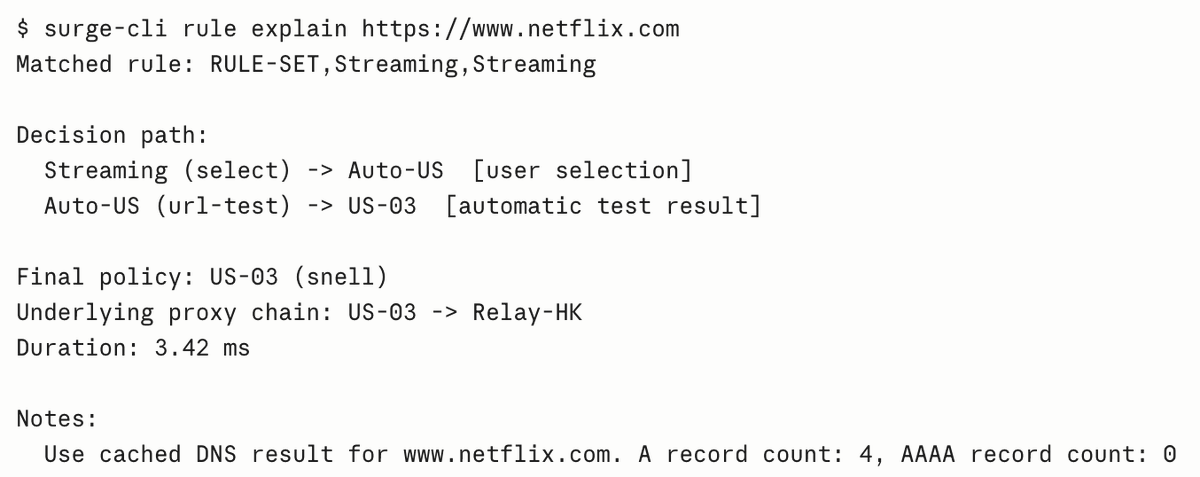
Surge CLI Updates As Surge CLI becomes a key foundation for integrating AI capabilities with Surge, we are continuing to expand and refine it. The interactive CLI now supports command history and auto-completion, making it significantly more convenient for both everyday use and exploratory workflows. We’ve also added a new set of useful commands, including rule match and rule explain, which let Surge answer a common debugging question without generating any real traffic: “Why would this request go through that policy?” **rule match** rule match performs a dry-run evaluation against the active rule set and reports the matched rule and final policy. All relevant matching attributes — including hostname or URL, port, process path, source address, client MAC, protocol, and more — can be supplied as key=value options. This makes it possible to reproduce exactly how a specific request or client would be routed. Combined with --raw, it can also be used in scripts to audit an entire list of domains against your current rules. **rule explain** rule explain goes a step further by showing why a particular policy was selected. It traces the complete policy-group resolution path and reports every decision along the way, including manual selections, automatic test results, overrides, load-balancing decisions, Smart Group selections, the underlying proxy chain, DNS evaluation notes, and timing information. Use rule match for quick checks and scripting, and rule explain when you need to inspect the complete decision path. And there’s more coming: starting with the next iOS TestFlight build, Surge CLI will be able to operate Surge directly on iOS. Stay tuned.

洪力天 @hzw0227
9 Followers 90 Following
Jonque @Jonquegoo
250 Followers 3K Following
CatTwi @bargain139
8 Followers 52 Following
Chaos @OTTChaos
104 Followers 605 Following
RY @Alison_xh
0 Followers 43 Following
mmini @minierliu
0 Followers 130 Following

PI-Guannan @lgunnn212523
22 Followers 177 Following


VibePixel @VibePixelEarth
515 Followers 901 Following Shares Earth art and their stories. Because it’s there, I pixel it.

AllenZhangSB @AllenZhangSB
45 Followers 397 Following


Rain @Rain_sometime
16 Followers 413 Following

Eaderun @eaderun
26 Followers 232 Following
iXeon @ixeono
4 Followers 86 Following



JnngFllp™ @JnngFllp
151 Followers 1K Following
rickyu @imrickyu
9 Followers 256 Following
Men1scus @Men1scus
219 Followers 5K Following CS @ Nankai University | Founding Engineer @ an AI startup | Side research: ImageGen · Data Infra | Rap enthusiast | 🏃🚴🏊🏋️🧗
FFFFFFFFF @hIV4DhJ2WX84487
0 Followers 45 Following
H0sh @URLDNS
5 Followers 728 Following
Waffleranger Epic @shortmonment
1 Followers 20 Following
niniwaiwai @luocaihong
1 Followers 201 Following
Asher @Asher_0225
4 Followers 312 Following
UUking丶 @PromiseNev
6 Followers 19 Following
MrShih @___Eumenides
12 Followers 49 Following
nb5p @nb5p_hQ
5 Followers 345 Following

溴化锂 @0x88FFA357
3K Followers 1K Following
Zephyr.Kkk @zephyr_kkk
14 Followers 343 Following

wnck.pp @wnckpp
8 Followers 355 Following
生锈 @OrangeCat59
323 Followers 3K Following

andrew @_h_ana___
907 Followers 806 Following building @rolldown_rs at @voidzerodev (acq. @cloudflare). prev @rspack_dev
宥空 @infoisall
7 Followers 178 Following
Anson @aa61598899
177 Followers 3K Following
hjun @HjunL51631
0 Followers 109 Following
Catherine Adkins @AdkinsCath18691
169 Followers 5K Following
Brandon.clp @ClpBrandon
16 Followers 708 Following
Teddy Gogh @teddygogh
33 Followers 95 Following
Surge @nssurge
23K Followers 1 Following Surge is an advanced network toolbox for iOS and macOS that captures your device's traffic and puts it under your control.You might like


















