Kyle @pasuggoon
iOS/macOS • System Security Joined August 2025-
Tweets82
-
Followers7
-
Following112
-
Likes340
tailscale + termius 를 맥북에 이제서야 설정했다. 너무 좋다. tmux도 이제서야 써봤다. 왜 진작에 안했지? 이제 노트북을 들고 다닐 필요가 없겠다.
여기저기 개발자 두시는분들이 많이 보인다. 나도 진심으로 취준도 하고 일도 하다가 그만두었다. 대신 관련 있지만 소방수같은 학계로 전직준비
Back in March, we announced @glazeapp, the easiest way to go from an idea to a desktop app. Today that's not just a beta for a lucky few anymore. Glaze is open to everyone. Try it out for free 👉 glaze.app Here's my personal take on why this one matters to me. Glaze is for the tinkerers and the toolmakers. The people who don't just use software, they shape it. We saw this with @raycast. We shipped an Extension API and people built their own tooling. Extensions for their exact workflow, others downloaded from the community, slowly stacked into a setup that was theirs and no one else's. If you look at someone’s Raycast setup, it is truly unique and you’ll never find the same again. That instinct, to bend your environment until it fits you perfectly, is deeply human. Tools are how we progress. Almost every leap we've made as humans came from a better tool. And today, so many of our tools are apps. They're how we organize our work, stay on top of things, and do more than we could on our own, and do it faster. Here's the problem with most software though: it's a compromise. To reach millions of people, companies build for the average. But the average doesn't really exist. We're all individuals. Even inside user groups, no two people work exactly alike, so the "one tool for everyone" always leaves something on the table. Glaze flips that. You describe what you want, and it builds a real app shaped around you. Not the average. You. What still surprises me most is the creativity. When we launched Raycast’s Extension API four years ago, I said the best moments would be the ones we never planned, when someone builds something we'd never have thought of. That still happens regularly. With Glaze it's happening at a much bigger scale, and honestly, I'm blown away by what people are coming up with. So go try it. It's free to start. And if you want to go further, there's a paid plan, plus private sharing so your team can build its own tooling, tailored to how you actually work, no compromises. When we started Raycast, we set out to change how people use their computers. Glaze is the next chapter. Let's see what you make. 💠

Glaze is now available to everyone. Try it today 👉 glaze.app

이것만큼 쉽고 아름다운 지도 라이브러리는 없는 듯.. mapcn.dev 지도 때문에 시간 날릴 필요가 없음. 설정 지옥에서 벗어나, 예쁘고, 빠르고, 커스터마이징하기 쉬운 지도를 원한다면 이게 답. 우선 shadcn/ui와 완벽하게 호환됨! 라이트/다크 모드 자동 전환, 다양한 기능과 디자인.. 그리고 이렇게 적어놨음. "mapcn은 모든 MapLibre 호환 타일과 연동됩니다. 즉, 사실상 어떤 제공업체의 타일이든 자유롭게 사용할 수 있다는 뜻입니다!" Zero config, one command setup... 말이 필요 없음. 멋짐..
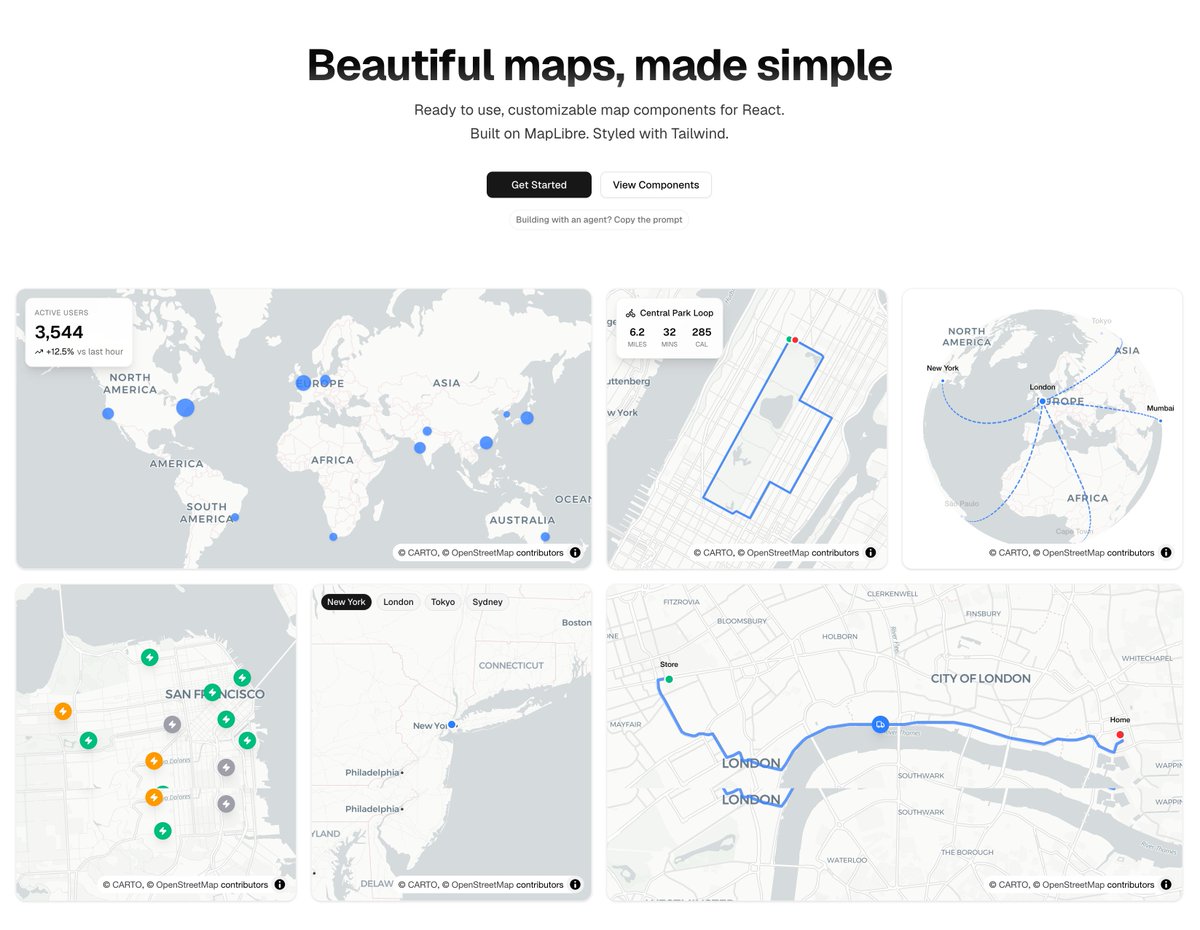

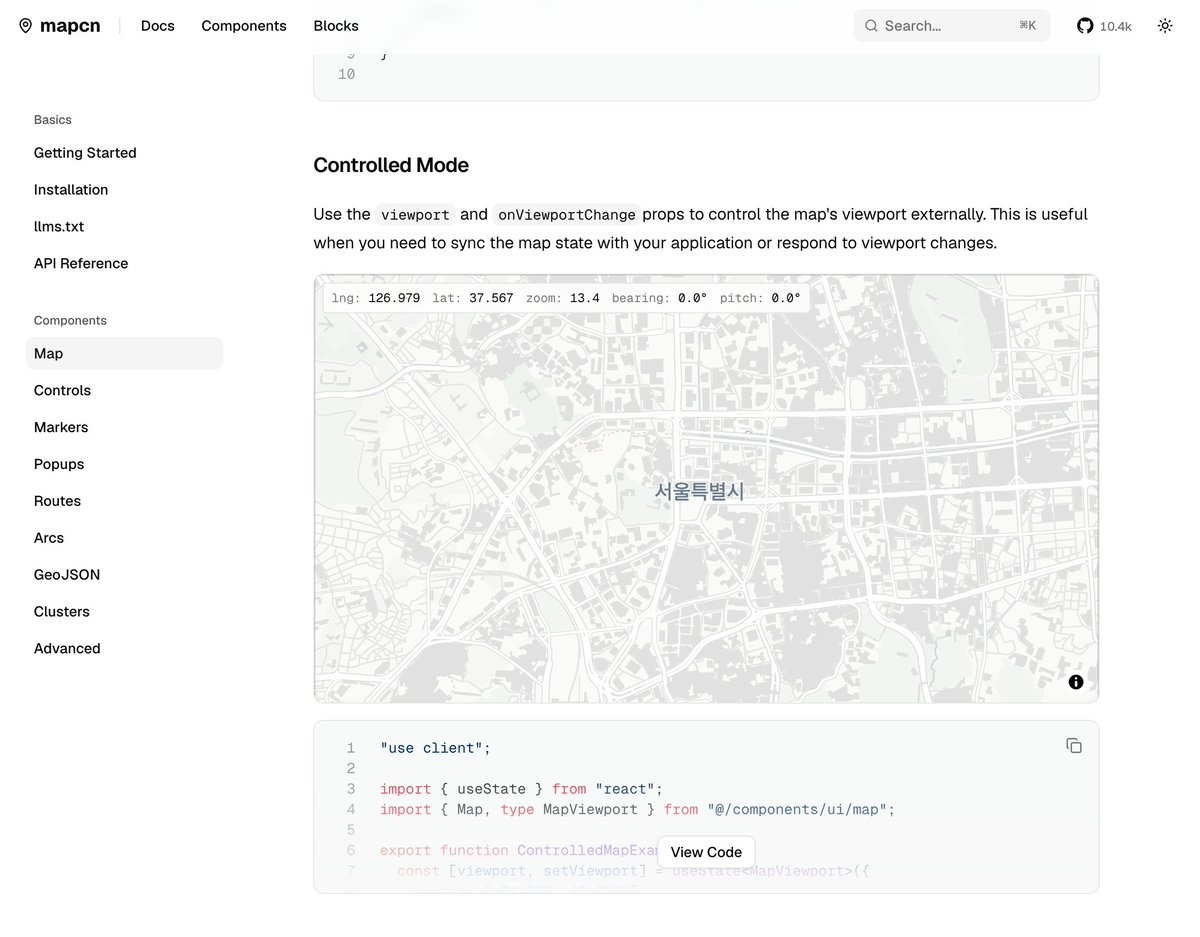

mapcn just hit 10,000 github stars! Something that started as a small side project has grown into this. This project has genuinely changed my life, introduced me to incredible people, and opened doors I never expected. Thank you to everyone who used it, shared it, or supported

lldb breakpoint set --name main run si breakpoint set --name __strcpy_chk continue (arm64)
lldb ./a.out breakpoint set --name "_main" run disassemble --frame
Mentioned HTML🫨 .md >? .html

New block in Notion: HTML. Build interactive HTML right on your Notion page. Ask AI to turn your content into interactive explainers, prototypes, or diagrams. Share with your team to use and tinker together.
@AsideAI >>>>>> Brave, Arc >>> Chrome, Firefox So satisfied with it lately 🌐

Its easy to take this stuff for granted (and you should, really). But there are some fun problems and details here to think about, despite still being very under development. If you like the details, read on. First, getting that "new split" animation right was tricky. The new split places at full size (so there is no resize jitter). Then, we pick a place to slide it out from: off window, beneath another split. Splits may be semi-transparent so there is an occlusion mask that we blank out pixels for, so even if its coming out from under a semi-transparent split, you don't see it blending through. We have to be careful how we animate in the divider. I'm not totally sold on the approach here, but right now it expands out as the split comes in. It felt better to have pixels from the new split start showing up immediately. But, still experimenting. For layout, all my prior split UIs on macOS and Linux used a nested view approach: recursive views of splits and leaves. This time, I did something different which was hugely beneficial: the tree structure is a tree, but I rasterize it to a 2D grid with absolute offsets. So the view is actually flat! Its just one layout view with N panes. The benefit of the flat view is that animation is very easy cause its all happening across one layer/grid. The "drop zone" animation is an overlay above the entire 2D grid. Its not intrinsic to the pane, it floats above it. This makes it easy to animate across the dividers as you can see in the video. Lesson learned from Ghostty, which does not do that and made animation impossible. The corner radius of the drop zone and panes by default tries to match the [dynamic] corner radius of macOS 26. So you always get a radius-perfect corner. Very annoying, but a good detail to get right. Going to keep hammering away at this...
Work-in-progress: a new split layout framework for nearly all Apple platforms (macOS, iOS, etc.). A mix of SwiftUI and raw CoreAnimation. The goal is "every frame perfect" animation. Still very wip, but getting there! Goal is to bring it back to Ghostty eventually.

Today, we're launching Aside, the AI browser you’ve waited for. ⋅ Crafted in every detail: vertical tabs and Liquid Glass ⋅ SOTA on agentic browsing benchmarks: outperforms Claude Fable ⋅ Full privacy: Everything runs in local and encrypted ⋅ You can use Claude or ChatGPT subscription The first AI browser built to do real work for you. aside.com
포인터, 이중 포인터 개념 익숙해졌는데 다른 개념들도 익숙하지 않아서 도전의식 생깁니다.

국립현대미술관에는 무료로 사용 가능한 라운지가 있다. 국립현대미술관 홈페이지에서 온라인 회원가입만 하면 1년에 12회 무료로 이용가능하다. 평일에 오면 사람 거의 없고 공간도 넓고 뷰도 좋고 조용해서 책 읽기 매우 좋은 장소다. 위치는 1층 테라로사 뒤편으로 ㄷ자로 돌아가면 교육동이 나오고 거기서 엘레베이터 타고 3층으로 올라가면 된다. 혼자만 알고 싶은 맛집 알려주는 느낌이지만 너무 좋은 장소라 공유드린다.


전에 컨퍼런스에서 만난적도 있는 오랫동안 node.js에 기여하고 있는 James의 글인데 동의되는 부분이 꽤 많이 있다. > - 오픈웨이트 모델은 컴파일된 바이너리랑 똑같고 오픈소스처럼 투명성을 전혀 제공하지 않는다.
swift 개발 재밌고 런타임 분석 재밌고 macOS 시스템 pwnable 공부도 재밌다 (학교 시험 중이기 때문) AppSec + SystemSec 공부 열심히 해봐야지 재밌는게 생겼다는게 좋다

apple/container, Container Machine 기능 추가 - Mac에서 Linux 컨테이너를 경량 가상 머신 형태로 생성·실행하는 도구 - WWDC26에서 새로 추가된 Container Machine 은 홈 디렉토리와 저장소가 자동으로 마운트된 빠르고 경량이며 영속적인 Linux 환경을 실행 가능 … news.hada.io/topic?id=30346


루샨 lucian @lucian__03
926 Followers 2K Following Python, JavaScript, C# 개발자. 루샨입니다! | AI빅데이터학과 휴학 중 | 요즘은 전부 바이브코딩 중
Cam Pak @CameronPak
1K Followers 4K Following I play the keys so I can write the codes. Indie hacking on https://t.co/6WuNyylgz0 and https://t.co/RPV1vhNHen. Working for https://t.co/IFaF7zGLFg

Dora Lee @dora_lee_1344
526 Followers 91 Following Co-founder&CTO of @AsideAI (YC F25) - The next AI browser

Jihoon Lim @hoondeveloper
121 Followers 333 Following design eng & swe | founding engineer @trypensive

Donghee Na @dongheena92
2K Followers 376 Following - ML Infrastructure SWE @ Karrot (당근) - Python SC(2025-2026) and Core dev Opinions are my own not my employer https://t.co/hh9qPaDb7c

Cam Pak @CameronPak
1K Followers 4K Following I play the keys so I can write the codes. Indie hacking on https://t.co/6WuNyylgz0 and https://t.co/RPV1vhNHen. Working for https://t.co/IFaF7zGLFg
루샨 lucian @lucian__03
926 Followers 2K Following Python, JavaScript, C# 개발자. 루샨입니다! | AI빅데이터학과 휴학 중 | 요즘은 전부 바이브코딩 중

adrian (adi) @adrianabelarde_
2K Followers 1K Following keeby (founder) no. 1 top paid app in macos app store https://t.co/2FyaHlMu8Y - on war with apple https://t.co/gNLLpNGKbO - $7.6K+ https://t.co/DAr27mF2lq
Thomas Paul Mann @thomaspaulmann
18K Followers 707 Following Building @raycast and @glazeapp, previously @facebook.
John Jeong (JJ) 🇰�... @computeless
1K Followers 758 Following designing interfaces for humans and agents @fastreplinc currently building @getcharnotes and @anarlogapp
~/☁️/🥑/justiny... @justinchronicle
3K Followers 3K Following Principal Developer 🥑 at @Microsoft & @github | Docker Captain | ex-Microsoft MVP | #AgenticAI #DevTools | Architect | Speaker | Author | Tweets are my own
Simyung Chang @SimyungChang
161 Followers 26 Following Building String — open-source runtime for AI agents. Founder @ H1R AI. AI agents need better workplaces.
David Im @davidim
6K Followers 529 Following ceo @sumelabs | prev https://t.co/hYV6eEUJEg & https://t.co/oLhZulPqBF | backed by @fdotinc


chann @channprj
2K Followers 1K Following 박희찬(Park Hee Chan, 朴熙燦). 👨🏻💻 Husband, Father, Product Engineer. Opinions are my own. Human Agent for Coding™️ with forgetting and hallucination.
you gyoung-yoon @rky0930
174 Followers 563 Following


Jac Peregrine-Davies @hellojac
175 Followers 160 Following of all trades // technical support @raycast

Bitrig @BitrigApp
4K Followers 740 Following Build native Swift apps by chatting with AI Made by co-creators of SwiftUI 🌐 https://t.co/QC3dHS5yeY 🎥 https://t.co/kQXms3pJS7 💬 https://t.co/pY4HlxTBMt


Pauline P. Narvas @paw_lean
21K Followers 1K Following 🌸 Developer Experience @OpenAI, prev @vercel @ona_hq 💜 Sharing thoughts in pixels since '08 🏋️♀️ Powered by endorphins
dalgom.bami @dalgom_bami
3K Followers 650 Following Building an AI meeting copilot for non-native professionals \ Co-Founder @ Frictionless AI · ex-Samsung · 15y SWE
victoria luo @toriluoo
4K Followers 679 Following everything about virality @newwave_ai | @fdotinc | 70k @xiaohongshu | northwestern every (good) product deserves a story.
John Yeo @johnyeo_
4K Followers 1K Following credits usage tracking limits billing price plans stripe @autumnpricing
joy p @joypbuilds
2K Followers 603 Following • building stitch: mini-vlog journal • create daily vlogs in one tap • founder @ viva interactive inc. • former game dev (concept artist) EN/KR
Dora Lee @dora_lee_1344
526 Followers 91 Following Co-founder&CTO of @AsideAI (YC F25) - The next AI browser

Max Kim @max_kim_dev
1K Followers 496 Following Professional Software Engineer, Amateur Writer & Archiver

shirish @shiri_shh
43K Followers 1K Following Generalist | AI | Tech | Startups ▪︎ Locked in ▪︎ Building https://t.co/fRlOjnbxgz

Greg Joswiak @gregjoz
179K Followers 142 Following Apple SVP Marketing Big believer in hw, sw and services integration ⌚️📱💻🖥 @UMich 🏈🏀⚾️🥎🏒 Animal lover 🐕🐈 Biking & the great outdoors ⛰🌅 he/him
Sean Allen @seanallen_dev
68K Followers 10 Following Founding GTM Engineer @BitrigApp. iOS Dev on YouTube (170K+ subs).
Simone Civetta @viteinfinite
712 Followers 523 Following Tech enthusiast. Developer. Proud father of two. Father of @swiftconn and @reactnativeconn. Engineering Lead @HymaiaFr.
Thomas Ricouard @Dimillian
56K Followers 4K Following Developer Experience, Codex @OpenAI Builder, Entrepreneur, iOS/macOS, Swift/SwiftUI & more


Async Swift @AsyncSwift
239 Followers 0 Following 🍎 Apple 생태계 속에서 헤엄치는 사람들의 커뮤니티 | 우리는 Swift라는 언어로 다양한 플랫폼에서 여러가지를 실현해냅니다. 아무 경계없이 Swift라는 공용어로 하나가 되는 커뮤니티입니다. #AsyncSwift #iOS #Swift #iOSDev
shek @shek_dev
10K Followers 5K Following Helping Solana Founders win @SuperteamBlack | Creator https://t.co/XnaKnhWgL3 | Dist Systems | Prev Founder @gumisfunn


Daniel Bernal @afterxleep
2K Followers 585 Following I build @FlowDeckStudio. Agents that build, test and debug iOS apps without Xcode. Also at @mymind, previously @DuckDuckGo & @Automattic.
Sungdoo Yoo @SungdooYoo
4K Followers 703 Following 뱅크샐러드에서 iOS 개발을 합니다. 접근성과 코드품질 향상에 관심이 많습니다. 매주 서평 혹은 iOS개발 블로그 글을 올리려 노력 중입니다.
Daegwon Nacyot Kim @nacyotKim
5K Followers 524 Following 한국어, English, 冷めたコーヒー. Claude Code Max, OpenAI Pro, M3 Ultra 512GB, Asus GX10. Aspiring value investor. @fortyfourbits. A software engineer at Karrot. 경부고속도로.You might like